Skip to content


The idea came up during a regular work afternoon. I had a Raspberry Pi 5 on my desk, a cup of coffee that was already going cold, and a simple curiosity: could this tiny board handle the same Chrome browser I use every day?
You can't install the official Google Chrome on Raspberry Pi, but you can run Chromium, which is almost the same and works well on Raspberry Pi OS.
That single question sent me down a rabbit hole of browsers, ARM limits, Chrome OS Flex experiments, and a surprising number of “almost but not quite” answers. Let’s go through all of them in a clear, simple way.
Can Raspberry Pi 5 run Chrome OS?
Some people think Chrome OS and Chrome browser are the same. Not quite.
Raspberry Pi 5 can run Chrome OS Flex, but it's not officially supported and may lack key features like Play Store.
Why Chrome OS Flex might work—but feels odd
Chrome OS Flex is a cloud-first OS, great on desktops, but the Pi 5 is still a low-power board. Installation takes effort, and hardware acceleration often fails. No Android apps, no official support—just a lightweight OS trying to feel like Chrome OS.
| Feature | Chrome OS Flex on Pi 5 | Real Chromebook |
|---|---|---|
| Android App Support | ❌ | ✅ |
| Google Play Store | ❌ | ✅ |
| Performance | ⚠️ Moderate | ✅ Optimized |
Can I run a web browser on Raspberry Pi?
Definitely—and it’s better than you might think.
Yes, Raspberry Pi supports multiple web browsers including Chromium, Firefox ESR, and lightweight options like Midori.

If all you need is to check emails or browse Reddit, the Pi handles that just fine.
Lighter hardware, lighter expectations
I usually tell people: don't expect buttery-smooth performance like on a MacBook. But if you load up Chromium or Firefox, keep tabs minimal, and use ad blockers, it’s totally usable for everyday stuff.
Is the Raspberry Pi 5 good for web browsing?
It depends what “good” means for you.
Yes, Raspberry Pi 5 handles basic web browsing well—just don’t open 20 tabs at once.
Faster than before—but still not a laptop
With 8GB RAM and better CPU, Pi 5 performs way better than Pi 3 or 4. Loading news sites, checking email, and even running simple web apps is now reasonable. But video-heavy sites or complex JS apps? That’s still a struggle.
Can I have Chrome in Linux?
Trick question—but important.
Yes, you can install Google Chrome on Linux, but only on x86-based systems, not ARM like Raspberry Pi.
What about ARM builds?
Google doesn’t offer ARM builds of Chrome. That’s why Chromium, its open-source sibling, is the go-to on Raspberry Pi. It’s like Coke vs. generic cola—tastes similar, but not quite the same recipe.
Is Chromium better than Chrome for Linux?
Depends on what you care about.
Chromium is more lightweight and open-source, but lacks features like auto-updates, DRM (for Netflix), and some Google sync options.
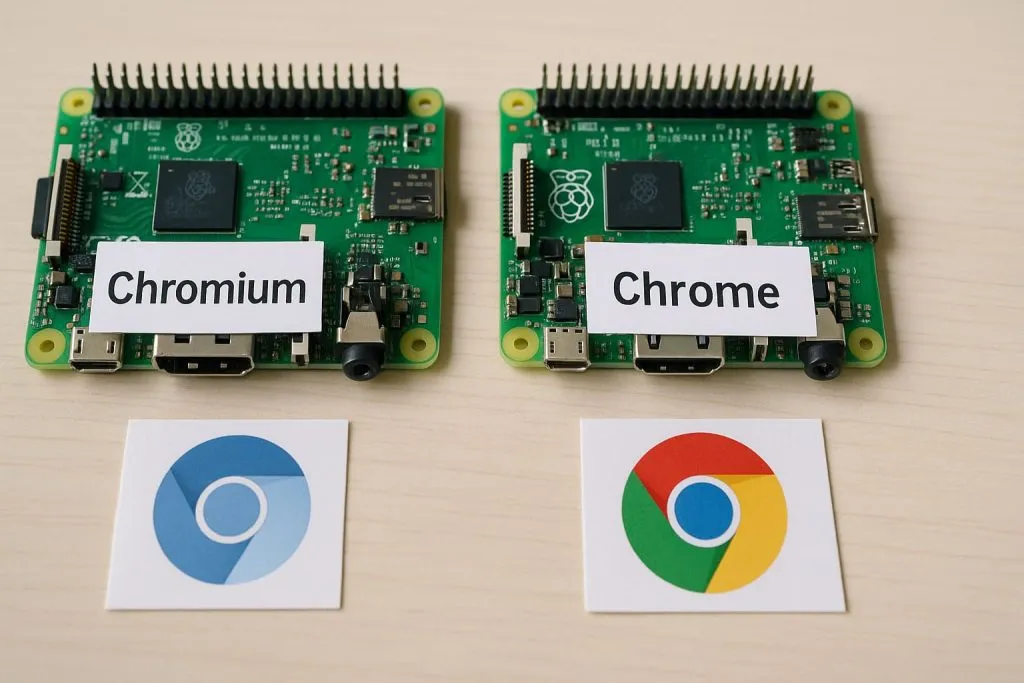
Side-by-side differences
If you're just browsing blogs or checking GitHub, Chromium’s fine. But if you want Netflix, password sync, or widevine DRM? You’ll hit a wall.
| Feature | Chrome | Chromium |
|---|---|---|
| Auto Updates | ✅ | ❌ |
| Widevine DRM | ✅ | ❌ |
| Sync with Google | ✅ | ⚠️ Limited |
| Resource Usage | ⚠️ Higher | ✅ Lower |
What is the best browser for Raspberry Pi OS?
Short answer: It depends on your workload.
For most users, Chromium is the best browser on Raspberry Pi OS—it’s optimized, stable, and supports basic features well.
Honorable mentions
- Firefox ESR: Good for privacy but can feel heavy.
- Midori / Epiphany: Fast but basic.
- LibreWolf: Great for privacy geeks.
If your Pi is headless or minimal, even text-based browsers like lynx or w3m still have a cult following.
Can Raspberry Pi run Chromium or Chrome OS Flex?
Let’s clear this up.
Raspberry Pi supports Chromium natively and can unofficially run Chrome OS Flex, though it's limited.
One works, one’s a hack
Chromium is smooth on Pi OS—it’s pre-installed. Chrome OS Flex, on the other hand, is tricky. You'll need to flash it manually and it often lacks Pi-specific driver support.
How do you install Chromium browser on Raspberry Pi?
Good news—it’s a one-liner.
You can install Chromium via terminal using sudo apt install chromium-browser on Raspberry Pi OS.

No hacks needed
It's usually already included in Pi OS. But if not, run the command, wait a few minutes, and you're set. No external downloads, no weird config.
Is there a way to use Google Chrome on Raspberry Pi 4 or 5?
Not directly—but there's a sneaky way.
You can’t install Google Chrome natively on Raspberry Pi, but you can use Chromium or stream Chrome via remote desktop.
VNC, PiServer, or remote tricks
One trick I tried: install Chrome on a laptop and use VNC Viewer on the Pi. It works! Is it laggy? Yes. Is it cool? Also yes.
What are the limitations of using Chrome on Raspberry Pi?
Ah, here's the catch.
Google Chrome doesn’t run natively on ARM, so no DRM support, slower performance, and no full Google services.
Expect trade-offs
You won’t get Netflix, some extensions may not work, and multitasking is limited. But for basic stuff? Still a solid bet.
Can you watch Netflix or YouTube with Chrome on Raspberry Pi?
YouTube? Yes. Netflix? Not really.
YouTube runs fine with Chromium, but Netflix needs DRM, which Chromium lacks by default.

Workaround or no-around?
Some folks patch Chromium to support Widevine DRM, but it’s messy. YouTube 720p is OK on Pi 5. Anything more? You’ll hear the fan scream.
How to improve web browsing performance on Raspberry Pi?
Don’t suffer—tune your setup.
Use lightweight browsers, limit open tabs, install ad blockers, and overclock the Pi for better browsing speed.
Vincent's Pi tuning cheat sheet
- ✅ Use
uBlock Originto cut ads - ✅ Disable animations and preload
- ✅ Run
sudo raspi-configto enable performance mode - ✅ Try
zramfor better RAM handling
Does Raspberry Pi support Chrome extensions and web apps?
Yes—mostly.
Chromium on Raspberry Pi supports most Chrome extensions and web apps, though some may not work due to ARM or DRM limits.

Extensions that work well
- uBlock Origin
- LastPass
- Google Docs Offline (partial)
But anything requiring heavy rendering or DRM (like video editors) will either lag or not work.
What are the differences between Chromium and Chrome for Raspberry Pi?
Let’s end with clarity.
Chromium is open-source and runs well on Pi, while Chrome is proprietary, faster, but unavailable on ARM-based Pi devices.
Final thoughts in a table
| Feature | Chromium on Pi | Google Chrome |
|---|---|---|
| Runs on Pi? | ✅ Yes | ❌ No |
| DRM Support | ❌ No | ✅ Yes |
| Extensions | ✅ Most | ✅ All |
| Auto Update | ❌ Manual | ✅ Built-in |
| Play Store | ❌ No | ✅ (on Chromebook) |
Conclusion
Chromium is your best bet—Chrome stays out of reach.